Mellow Mummy: video baby monitors : Taking life as it comes...
Showing posts with label video baby monitors. Show all posts

Sunday, 6 January 2013

Motorola MBP36 Wireless Video Baby Monitor Review

Over Christmas we tested out the Motorola MBP36 wireless video baby monitor by Binatone.  We used it both at home and away from home to get  good feel for its portability and ease of use.  Past experience tells me that sound quality or advanced features are usually sacrificed for the quality of the video image but the MBP36 doesn't seem to sacrifice anything; it has all of the features I look for in a baby monitor, great sound quality and the clearest video picture I have yet to see in a remote, infra-red camera.
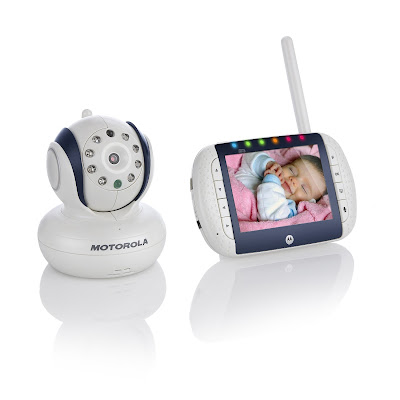
MBP36 Motorola Video Monitor

The parent unit is wireless with a rechargeable battery so you can take it with you around the house; We found the battery to lose its charge faster than we would wish and I was glad that I took the power cable with me on Christmas night as the charge only lasted a couple of hours without it. I like the big 3.5 inch screen and I find the parent unit compact and lightweight. The colour reproduction when the lights are on in the nursery is (as is often the case) washed out but the image is incredibly crisp and clear both in daylight and in darkness.

The single most impressive feature of the MBP36 is the pan and tilt functionality. From the video unit I can move the camera up, down and side to side which is perfect for us right now as Holly often wakes herself up by banging her head on the top of the cot (even though she is put to sleep at the bottom).

I found all of the basic controls easy to use as the buttons are all on the front but I was VERY frustrated by the fact that you could only turn the sound down by entering the menu mode and selecting the volume - it required too many button presses for me to do this and I think it would be far easier if there were buttons dedicated solely to volume.  The same went for the music mode - I absolutely love having a baby monitor on which I can remotely request for lullabies to be played in the nursery but I'd rather not have to go into menus and select this, I'd rather be able to do it using one or two presses of a dedicated button.  Surprisingly, the MBP36 does include a button which will switch the screen display off in one touch.

Quite unusually for a video monitor, there is a talkback functionality which is something I really miss when I don't have it.  I found the nursery temperature to be very accurate and, although I personally don't use it, I know lots of tech-savvy parents like the ability to output the image to video or PC.
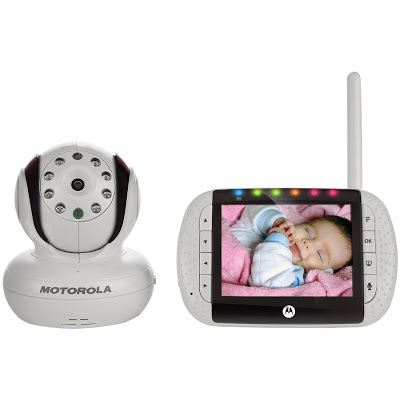
Motorola MBP36 Wireless Video Baby Monitor

I would say that this is the best quality video baby monitor that I have tried to date and I am sorely tempted to get one; in fact, if the button functions were improved, I think I probably would replace my existing baby monitor with the MBP36.


Thursday, 23 August 2012

Samsung Baby Monitor SEW-3035 Review and Giveaway

The Samsung SEW-3035 is a wireless video monitoring system ideal for use as a wireless video baby monitor. It has a very smart looking remote camera that you place in the nursery and a hand-held parental unit (about the size of a large smartphone) with a 3.5 inch video screen to receive the images of your baby.

A little over 18 months ago I reviewed the precursor to this video monitor (the SEW-3030) and I am really glad to see that some of the feedback I gave at the time has been taken on board by Samsung. The SEW-3035 is a big improvement on the old monitoring system.


The Samsung wireless video monitoring system is an advanced piece of kit. Not only does it allow you to see and hear your baby upto 100m away but it also allows you to record the images directly onto Micro SD card (see a very sleepy Holly below!). You can connect the parent unit directly to your TV or computer using the AV output and USB connectors to allow you to either download the video images or to play them directly on a larger screen.

The Samsung monitoring system also allows you to connect it to your computer and use the camera via Skype (or other video applications) so that you can use it as a remote monitoring system. You can even connect another 3 cameras to one video unit (I know that one of my readers did this with their SEW-3030 successfully so that they could monitor more than one child at once).

I found the menu system and buttons on the parent unit very intuitive to use - I didn't even need to read the instructions, it just all felt natural. Using the shaped button on the front of the unit moved the menu options left/right/up/down and pressing the central button selected the different options.

I found the image quality to be EXTREMELY crisp, the best I have seen yet on my family tech travels and I was glad to see that the colour during daylight hours was less washed out than in the old model. I was also glad to see the back of the tinkly honky tonkely lullabies (there are no lullabies on the new version) and the sound quality was marginally improved although still nowhere near as crisp and reliable as the image quality.


There is a talkback feature on the SEW 3035 that I used a couple of times successfully to calm Holly back to sleep and there is also a sleep mode which allows you to switch off the screen of the monitor (perhaps to reduce light emitted while you sleep, or to save battery power), it takes some configuration to get the sleep mode to kick back in when it hears noise coming from the nursery though and I still think this is an area for improvement by Samsung.

My only real disappointment with the Samsung SEW 3035 is the temperature sensor. It seems like such a good idea that you can set an alarm to sound if the room goes below or above your chosen range of temperature but I actually had to set it to alert me about 4-6 degrees hotter than it really was in the room because it claimed that our nursery was a steady 28 degrees (errr, it isn't). I remember this being a problem last time too but once you have altered the alarm settings it isn't too much of a problem.

At around £149.99 I think that the SEW 3035 is a good value wireless video baby monitor considering how much tech it packs into a tiny little package!


To celebrate the launch of the SEW 3035 by Samsung, I have 5 Samsung baby blankets to give away. If you would like to win a snuggly baby blanket then leave me a comment below before the 7th september to let me know what your favourite bit of baby tech is or was - perhaps a baby monitor you loved or a kitchen gadget you couldn't have lived without or even a favourite techy baby toy.

Disclosure: I loaned the video monitor for the purposes of my review.


TERMS and CONDITIONS:
  1. The competition is open to UK residents only.
  2. Only one comment entry per person. Multiple, automated or bulk entries will result in immediate disqualification
  3. The winner will be contacted by email.
  4. Entries will only be deemed valid if a valid email address is provided when commenting - people who just log into intensedebate with their facebook account will not qualify for entry because it is too difficult for me to contact the winners
  5. The winner will be selected at random from all valid comments received by 11.59pm on 7th September.
  6. The judges decision is final and no correspondence will be entered into
  7. The winner's names will be published on this site

Sunday, 8 April 2012

Hestia H100 Wireless Video Baby Monitor Review

hestia wireless baby video monitor pink
In the run up to the arrival of baby Button II we have been trying out the Hestia baby video monitor for my sister site, FamilyTech thanks to Comfy Babies, a brand new website for baby gifts.

The Hestia wireless video baby monitor comes in blue or pink (choosing which one was a bit tricky given we don't yet know what flavour baby is). We plumped for pink given we already have a daughter and I was quite suprised at HOW pink it was!!! In fact, the product doesn't have a great quality feel to it at all - it looks a bit plasticy BUT don't let you put that off. At just £69.95 I think this is awesomely good value for money and I was really impressed by the functionality once I abandoned my judgemental first impressions.

hestia baby video monitor in blue

The Hestia H100 video monitor has two pieces. The camera unit which sits in your baby's nursery and transmits a very crisp quality image and the wireless parent unit that receives the image. You can sync upto 4 cameras with a single parent unit and then switch between camera views with a single button press.

The camera unit has a limited range of movement but the adjustment is simple and easy to do so you will probably never have a problem positioning the camera where it can get a good view of your baby. You can also choose to mount it on the wall if you want to.

The colour quality on the parent unit is a little washed out (grey and milky and not awfully representative of the real-life colours) but the image clarity makes up for this. It compares VERY favourably with other video baby monitors I've tried in the past in terms of the clarity of image and sound. The parent unit when used in VOX mode, is capable of switching itself off after a period of inactivity in order to save energy; with many other brands of baby monitor (video or otherwise) I have found the point at which the parent unit is triggered to come back on again a bit too late but the Hestia baby monitor responded promptly to sound in my daughter's nursery.

At night, or in low lights, the camera automatically uses infra-red technology so that you can continue monitoring your baby.

hestia video monitor parent unit in pink

The Hestia H100 wireless baby video monitor doesn't play music or provide talkback - it just provides a simple yet secure monitoring device and it seems to do that well.
Related Posts with Thumbnails